-
Shop
- Advanced Technologies
- AI Career Advantage Collection
- AI Skills
- AI Skills for Creators & Freelancers
- AI Client Management
- AI Ethics
- AI Mindset
- AI Tools & Prompts
- AI Writing & Content Creation
- Audio, Voice & Music
- Design & Visual Creation
- Email, Messaging & Communication
- Freelancing & Business
- Marketing, Ads & Conversion
- Productivity, Workflow & Automation
- SEO & Search Optimization
- Social Media Content & Growth
- Strategy, Planning & Analytics
- Video Creation & Editing
- AI Skills Mastery 2026 Collection
- Car Accessories
- Confidence
- Dating & Social Skills
- Digital Resources
- AI & Technology
- Beauty
- Budgeting & Saving
- Car Buying & Ownership
- Cozy Feast Collection
- Electronics & Technology
- Entrepreneurship & Business Growth
- Financial Education
- Financial Independence
- Financial Mindset & Psychology
- Goal Setting
- Home Styling & Organization
- Kitchen & Recipes
- Leadership
- Mindfulness
- Mindset
- Online Business
- Parenting & Child Development
- Personal Style & Fashion
- Pet Lifestyle & Wellness
- Positive Thinking
- Sleep Improvement
- Smart Life with AI
- Stress Management & Relaxation
- Travel Planning
- Wellness
- Yoga & Fitness
- Yoga & Mind-Body Practices
- Education & Learning
- Family & Parenting
- Fashion
- Fashion Accessories
- Furniture
- Gadgets
- Health & Beauty
- Health & Wellness
- Home & Garden
- Home Supplies
- Jewelry
- Kids & Babies
- Kitchen
- Kitchen Best-Sellers
- Lighting
- Online Business for Beginners
- Patio, Lawn & Garden
- Personal Growth
- Pet Care
- Pet Supplies
- Pets
- Shoes
- Smart Amazon Shopping
- Smart Home Living Guides
- Sport & Outdoors
- Super Deals
- TikTok Growth & Monetization Mastery
- Travel
- Travel & Adventure
- Wealth
- Popular
- Best deals
Wireless RGB Gaming Headset: 3 Mic Modes Setup Guide
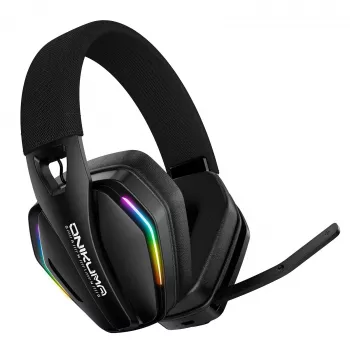
Wireless Gaming Headset with RGB Lighting and Adjustable Mic, 3 Modes
A wireless headset can make a gaming setup feel instantly cleaner: no cable tugging at the desk, no snagging when you stand up between matches, and fewer distractions when you’re trying to focus. The best part is that wireless convenience doesn’t have to come at the expense of communication—especially when the microphone offers multiple modes that can adapt to your room, your voice, and your platform.
Below is a practical guide to what matters most in a wireless gaming headset with RGB lighting and an adjustable mic with three modes, along with setup tips and quick checks that help you get clear chat without constantly tweaking settings.
What This Headset Is Designed For
- Wireless freedom for couch play, desk setups, and quick breaks without removing the headset.
- RGB lighting to coordinate your setup’s look and make the headset easier to spot on a shared desk or shelf.
- Adjustable microphone modes that can better match noisy rooms, quiet rooms, and voice-focused scenarios.
- Everyday comfort that supports longer sessions: stable fit, breathable padding, and manageable clamping force.
If you want a simple, value-friendly option built around these priorities, the Wireless Gaming Headset with RGB Lighting and Adjustable Mic, 3 Modes is designed to cover the essentials without overcomplicating the experience.
Key Features to Pay Attention To
- Wireless connection type and stability: Consistent audio and a reliable link usually matter more than maximum advertised range.
- Latency considerations: Lower delay is most noticeable in competitive shooters and rhythm games where timing feedback is immediate.
- Battery behavior: Real-world playtime changes with volume, mic use, and whether RGB lighting stays enabled.
- Mic monitoring / sidetone (if available): Hearing a bit of your own voice can help prevent shouting during intense moments.
- On-ear controls: Volume, mute, and mode switching should be easy to find by touch so you’re not hunting mid-match.
Quick buying checklist
| Feature | Why it matters | What to check before buying |
|---|---|---|
| Adjustable mic modes | Improves voice clarity across different rooms and use cases | How modes are toggled; whether a mute button is separate from mode cycling |
| Wireless connection | Reduces cable clutter and increases mobility | Supported devices; stable pairing; any included receiver or cable options |
| RGB lighting | Aesthetic customization and setup matching | How it’s controlled; whether it can be turned off to save battery |
| Comfort and fit | Long sessions require pressure balance and padding quality | Headband adjustability; earcup depth; overall weight |
| Controls and indicators | Faster adjustments mid-game | Dedicated volume wheel; mic mute; clear battery/connection indicators |
How Adjustable Mic Modes Help in Real Use
Mic “modes” typically adjust processing such as noise reduction, sensitivity, and how strongly your voice is emphasized. Having three selectable options is useful because the same mic setting rarely works perfectly for every room.
- Mode for noisy backgrounds: Helps reduce steady room noise from fans, keyboards, or nearby conversation—handy for party chat in busy homes.
- Mode for voice focus: Designed to keep speech prominent if you talk softly, sit slightly off-axis, or stream while trying not to wake others.
- Mode for general use: A balanced default for casual play, calls, and mixed environments.
Practical tip: Use your platform’s built-in mic test (PC sound settings, console voice settings, or your chat app) and record a short sample while typing or clicking your mouse. Pick the mode that keeps your voice clear without pumping or cutting out between words.
Placement matters: Position the mic near the corner of your mouth rather than directly in front. This often reduces breath noise and plosives (“p” and “b” pops) while keeping your voice present.
RGB Lighting: When It’s Useful (and When to Turn It Off)
RGB isn’t only about looks—though matching your keyboard, mouse, and PC lighting can be satisfying. It can also be a functional cue: a quick glance can help you identify your headset on a shared desk or confirm it’s powered on.
Comfort, Fit, and Audio Balance
- Clamp force: Too tight creates pressure points; too loose breaks the seal and can make bass feel thin.
- Seal and isolation: A decent seal can improve bass response and reduce outside noise so you’re not tempted to crank volume.
- Glasses-friendly fit: Softer pads and moderate clamp help reduce hot spots on the arms of glasses.
- Safer listening: Lower volumes reduce risk over time. For background on hearing protection basics, see the CDC guidance on harmful noise levels.
Setup Tips for PC and Console Play
If your headset connects via Bluetooth on certain devices, remember that Bluetooth behavior can vary by hardware and operating system. For a basic overview of the technology, the Bluetooth SIG is a helpful reference.
Product Snapshot
At-a-glance details
| Item | Details |
|---|---|
| Product | Wireless Gaming Headset with RGB Lighting and Adjustable Mic, 3 Modes |
| Price | $36.67 USD |
| Availability | In stock |
In-stock picks to complete your setup
- Wireless Gaming Headset with RGB Lighting and Adjustable Mic, 3 Modes
- Levi’s Men’s White Short-Sleeve T-Shirt (comfortable, simple option for long sessions)
- Calvin Klein Jeans Women’s Grey Print Wallet with Zip Fastening (easy grab-and-go accessory)
FAQ
What do the three microphone modes change?
They typically adjust voice processing such as noise reduction, sensitivity, or EQ to better match different rooms. Test each mode using your platform’s mic test and keep the one that sounds clearest without cutting out or adding distortion.
Does RGB lighting reduce battery life on a wireless headset?
Yes—lighting generally increases power draw. Turning RGB off (or using a static, lower-brightness effect) can help extend playtime between charges.
How can voice chat sound clearer to teammates?
Place the mic near the corner of your mouth, lower input gain if you’re clipping, and choose the mic mode that best matches your room noise. If available, enable echo cancellation/noise suppression in your chat app or console voice settings.
Recommended for you

Mindful Dating Explained: How to Date With Intention
Aug 11, 2026













Leave a comment