-
Shop
- Advanced Technologies
- AI Career Advantage Collection
- AI Skills
- AI Skills for Creators & Freelancers
- AI Client Management
- AI Ethics
- AI Mindset
- AI Tools & Prompts
- AI Writing & Content Creation
- Audio, Voice & Music
- Design & Visual Creation
- Email, Messaging & Communication
- Freelancing & Business
- Marketing, Ads & Conversion
- Productivity, Workflow & Automation
- SEO & Search Optimization
- Social Media Content & Growth
- Strategy, Planning & Analytics
- Video Creation & Editing
- AI Skills Mastery 2026 Collection
- Car Accessories
- Confidence
- Dating & Social Skills
- Digital Resources
- AI & Technology
- Beauty
- Budgeting & Saving
- Car Buying & Ownership
- Cozy Feast Collection
- Electronics & Technology
- Entrepreneurship & Business Growth
- Financial Education
- Financial Independence
- Financial Mindset & Psychology
- Goal Setting
- Home Styling & Organization
- Kitchen & Recipes
- Leadership
- Mindfulness
- Mindset
- Online Business
- Parenting & Child Development
- Personal Style & Fashion
- Pet Lifestyle & Wellness
- Positive Thinking
- Sleep Improvement
- Smart Life with AI
- Stress Management & Relaxation
- Travel Planning
- Wellness
- Yoga & Fitness
- Yoga & Mind-Body Practices
- Education & Learning
- Family & Parenting
- Fashion
- Fashion Accessories
- Furniture
- Gadgets
- Health & Beauty
- Health & Wellness
- Home & Garden
- Home Supplies
- Jewelry
- Kids & Babies
- Kitchen
- Kitchen Best-Sellers
- Lighting
- Online Business for Beginners
- Patio, Lawn & Garden
- Personal Growth
- Pet Care
- Pet Supplies
- Pets
- Shoes
- Smart Amazon Shopping
- Smart Home Living Guides
- Sport & Outdoors
- Super Deals
- TikTok Growth & Monetization Mastery
- Travel
- Travel & Adventure
- Wealth
- Popular
- Best deals
Smart Mapping Robot Vacuum: 2200Pa, 120-Min, App
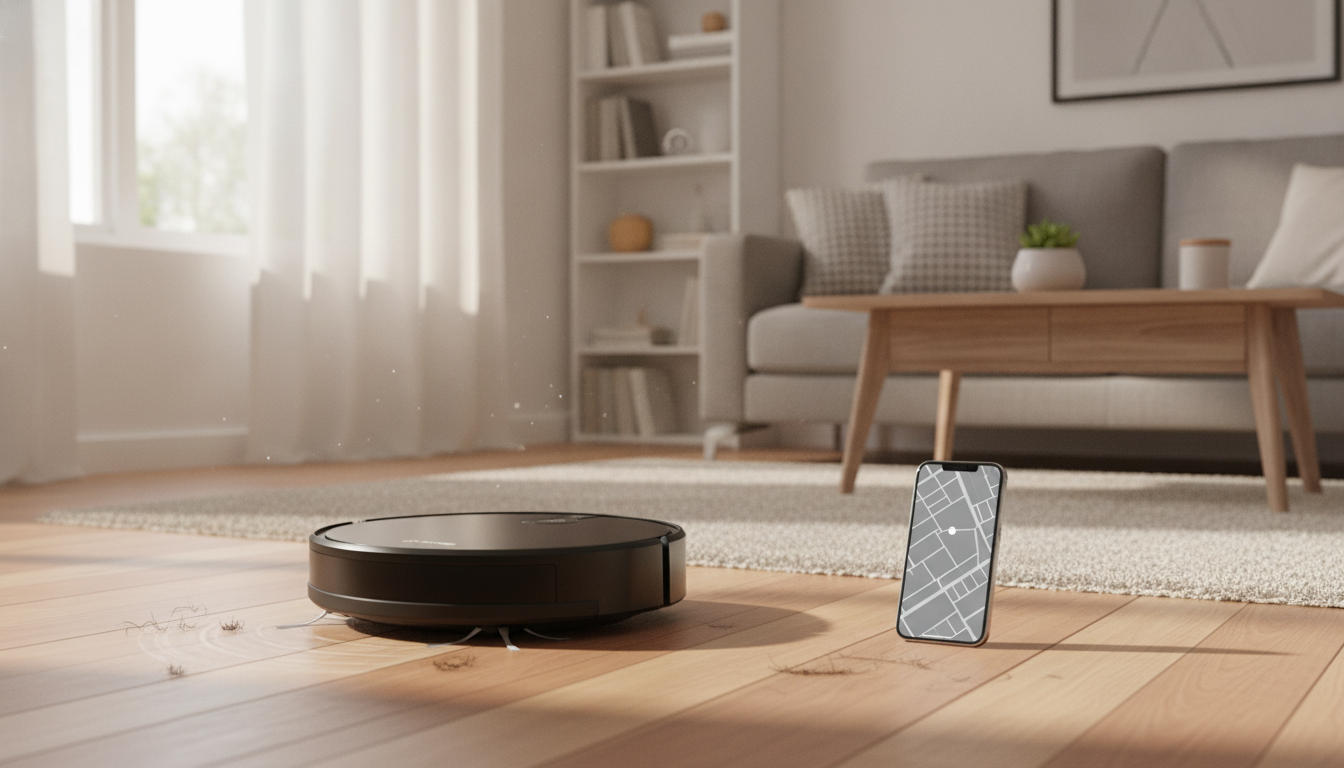
Smart Robot Vacuum with Mapping, 2200Pa Suction, 120-Min Runtime & App Control
A mapping robot vacuum can take daily cleaning off your plate by learning the layout, navigating efficiently, and letting schedules run from an app. This guide breaks down what to expect from a 2200Pa, 120-minute smart robot vacuum: how mapping works, what the suction level means on real floors, how to set up app controls, and the habits that keep performance consistent over time. For more guidance, see Monsga Robot Vacuum | Official website.
Quick look: what it’s designed to do
- Automates routine dust and debris pickup on hard floors and low-to-medium pile rugs
- Uses mapping navigation to reduce random passes and missed areas
- Balances suction power with a longer runtime to finish more space per charge
- App control supports scheduling and basic cleaning mode changes without touching the unit
- Best results come from simple prep: declutter cables, tidy small objects, and maintain the brush and filter
If you’re shopping for a straightforward daily-clean helper, the Smart Robot Vacuum with Mapping, 2200Pa Suction, 120 Min Runtime & App Control is built around the features that matter most for routine upkeep: structured navigation, strong-enough suction for everyday mess, and an app that makes consistency easy. For further reading, see Laresar Clean Robot Vacuums and Mop 5000Pa,3 in 1 ….
Key specs and what they mean in day-to-day cleaning
- Mapping: builds a layout to improve coverage and reduce repeated cleaning of the same spots
- 2200Pa suction: a strong level for fine dust, crumbs, and tracked-in debris; performance also depends on brush design, seals, and bin airflow
- Up to 120 minutes runtime: supports longer sessions, especially on lower power modes; real-world time varies with floor type and suction setting
- App control: enables scheduled runs, start/stop, and often mode adjustments; Wi‑Fi stability and permissions matter for reliable control
| Feature | What it helps with | Practical tip |
|---|---|---|
| Mapping navigation | More consistent coverage and fewer missed edges | Run an initial mapping clean with doors open and obstacles removed |
| 2200Pa suction | Better pickup of grit and pet hair on hard floors and rugs | Use higher suction for entryways and rugs; lower for quiet daily runs |
| 120-minute runtime | Cleans larger areas per charge | Schedule during low-traffic times to avoid interruptions |
| App control | Hands-off scheduling and quick spot clean starts | Keep the vacuum’s firmware/app updated to reduce connectivity issues |
Mapping and navigation: getting the most accurate map
Mapping is where a robot vacuum stops feeling “random” and starts feeling reliable. The most accurate maps usually come from a calm, open first run—think of it as showing the robot your home when it’s at its easiest to navigate.
- Start with a full “open layout” run: open interior doors, move chairs and lightweight floor items, and remove cords.
- Keep the charging dock in a stable location with clear space around it so the robot can re-dock consistently.
- Expect improved routes after a few cycles as the vacuum learns typical pathways and problem areas.
- If the map becomes inaccurate (frequent bumping, repeated loops), clear the app map and remap after cleaning sensors and wheels.
- For multi-room performance, use consistent thresholds and keep floor transitions clear of clutter that can block pathing.
Suction and cleaning performance by floor type
“2200Pa” is a helpful benchmark, but pickup is a team effort between suction, brush agitation, air path design, and how clean the filter and bin are. With that in mind, here’s what a 2200Pa-class robot vacuum typically handles well.
- Hard floors: strong results on dust, crumbs, and hair; use a daily schedule to prevent grit buildup near entryways.
- Rugs and low-pile carpet: higher suction improves hair pickup; run slower, methodical passes for best results.
- Edges and corners: robot vacuums typically do best with routine runs; occasional manual touch-ups may still be needed in tight corners.
- Pet hair: consistent brush cleaning prevents wrap and maintains airflow; empty the bin more often during heavy shedding weeks.
- Kitchen zones: frequent short runs reduce debris scattering; consider a quick pre-sweep of large particles like cereal pieces.
Battery life and coverage planning
App control: setup, scheduling, and reliable connectivity
For general home network best practices (like router placement and signal troubleshooting), the FCC’s consumer guidance is a useful reference: https://www.fcc.gov/consumers/guides.
Maintenance that keeps suction and mapping consistent
For additional maintenance guidance that applies to many vacuum styles, ENERGY STAR’s overview is a helpful baseline: https://www.energystar.gov/products/lighting_fans/vacuum_cleaners.
Common issues and quick fixes
More in-stock picks to round out your space
- Smart Robot Vacuum with Mapping, 2200Pa Suction, 120 Min Runtime & App Control
- Pink Floating Platform Bed with LED Lights and Diamond Tufted Headboard
- Calvin Klein Jeans Women’s Grey Print Wallet with Zip Fastening
FAQ
Is 2200Pa suction strong enough for pet hair and crumbs?
2200Pa is generally strong for day-to-day crumbs, dust, and pet hair on hard floors and low-pile rugs. Results also depend on brush design, airflow, and maintenance—use higher suction on rugs and keep the brush and filter clean to prevent hair wrap and suction loss.
How long does a mapping robot vacuum take to learn a home layout?
Many mapping robots can create a usable map in an initial full run, then refine routes over the next few cleaning cycles. For the fastest, cleanest map, start with doors open and floors cleared of cords and small items, and remap if the layout changes significantly.
What should be cleaned regularly to keep runtime and suction consistent?
Empty the dustbin often, clean or replace the filter as needed, and remove hair from the main and side brushes. Also wipe sensors and charging contacts and check wheels for buildup, since clogs and drag can reduce suction and shorten runtime.
Recommended for you
Best Diet for Pet Rats: Pellets, Veggies & Treats
Jul 23, 2026













Leave a comment